Showing posts with label iOS. Show all posts

Monday, June 10, 2013

Apple Unveils iOS 7

Completely Redesigned With Stunning User Interface & Great New Features

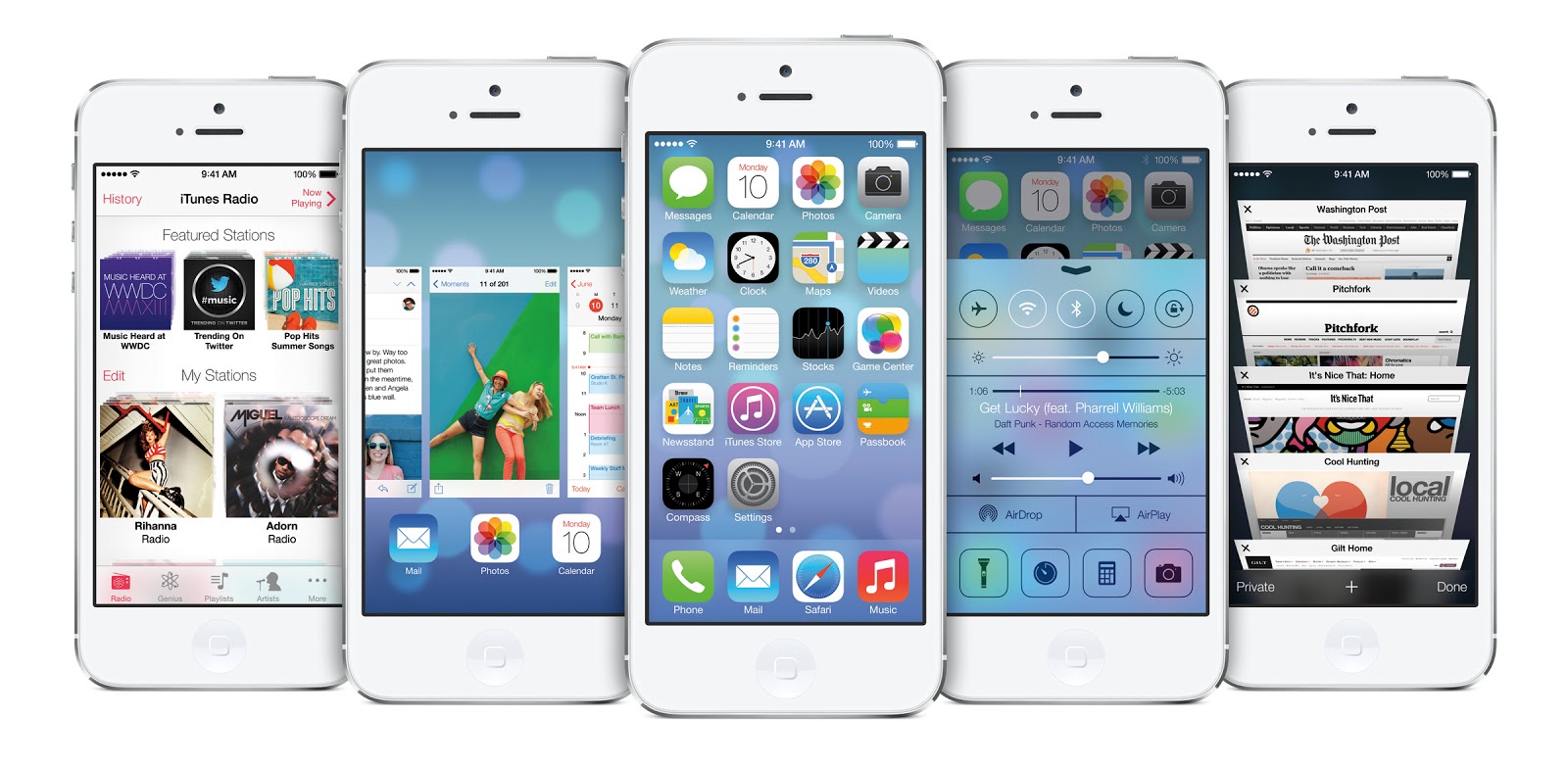
  SAN FRANCISCO―June 10, 2013―Apple® today unveiled iOS 7, the most significant iOS update since the original iPhone®, featuring a stunning new user interface. iOS 7 is completely redesigned with subtle motion, an elegant color palette and distinct, functional layers that make it feel more alive. The typography has been refined for a cleaner, simpler look, and the use of translucency and motion makes even simple tasks more engaging. iOS 7 has hundreds of great new features, including Control Center, Notification Center, improved Multitasking, AirDrop®, enhanced Photos, Safari®, Siri® and introduces iTunes Radio™, a free Internet radio service based on the music you listen to on iTunes®.

“iOS 7 is the most significant iOS update since the original iPhone,” said Craig Federighi, Apple’s senior vice president of Software Engineering. “To create it, we brought together a team with a broad range of expertise from design to engineering. With what we’ve been able to achieve together, we see iOS 7 as an exciting new beginning.”

“There is a profound and enduring beauty in simplicity, in clarity, in efficiency. True simplicity is derived from so much more than just the absence of clutter and ornamentation—it’s about bringing order to complexity,” said Jony Ive, Apple’s senior vice president of Design. “iOS 7 is a clear representation of these goals. It has a whole new structure that is coherent and applied across the entire system.”
 

 iOS 7 is completely redesigned with an entirely new user interface, but will be instantly familiar to the hundreds of millions of iPhone, iPad® and iPod touch® users around the world. The new interface actually makes your phone appear bigger because everything is designed to take advantage of the entire screen. The redesigned fonts look amazing on the Retina® display, creating even sharper text.

iOS 7 introduces Control Center. Now the controls you want to access quickly are all in one convenient place. With just one swipe from the bottom of your screen, you have access to controls for Airplane Mode, Wi-Fi, Bluetooth or Do Not Disturb, and the ability to adjust screen brightness, pause or play a song, jump to the next track and stream your music with AirPlay®. Control Center also gives you instant access to apps such as Clock, Camera, Calculator and the Flashlight.

With iOS 7, Notification Center is now available from the Lock screen so you can see all your notifications with a simple swipe, and the new Today feature in Notification Center gives you an at-a-glance view of your day with a summary of the important details such as weather, traffic, meetings and events.

With improved Multitasking in iOS 7, developers have the ability to enable any app to multitask in the background with a new API. Users have the ability to switch between their apps in a more visual and intuitive way, and iOS 7 pays attention to which apps you use most and automatically keeps your content up to date in the background.

AirDrop is an entirely new way to quickly and easily share content with people nearby. When you’ve got something you want to share, AirDrop shows you your contacts close by. Just select who you want to share with and AirDrop does the rest. AirDrop transfers are peer-to-peer so you can use it anywhere, without any network or set up required, and transfers are fully encrypted so your content is protected and private.

iPhones are used to take more photos around the world every day than any other camera, and with iOS 7 the new Camera app features filters so you can add real-time photo effects. The Camera app now includes a square camera option, and you can quickly and easily switch between your four cameras—video, photo, square and panorama—with just a swipe.

iOS 7 includes a redesigned Photos app that introduces Moments, a new way to automatically organize your photos and videos based on time and location. You can zoom out to see all your photos organized by Moments, Collections of Moments and Years. iOS 7 includes iCloud Photo Sharing, the easiest way to share just the photos you want with just the people you want. With iCloud® Photo Sharing, family and friends can contribute their own photos and videos to your shared photo streams, and the new Activity view displays updates from your shared streams all in one place.

Safari’s redesigned user interface lets you see more of your content—starting with full-screen browsing. The new smart search field helps simplify searching, and there’s a new view for your bookmarks and your Safari tabs. With iCloud Keychain®, your passwords and credit card information are securely stored and available on all your devices, so navigating password protected sites or autofilling during transactions is simple and secure. Enhanced Parental Controls allow you to automatically block access to adult websites or only allow access to a specific set of permitted websites.

Siri sounds better than ever with new male and female voices and includes Twitter search integration, so you can ask Siri what people are saying on Twitter*. Siri also now has Wikipedia integration, providing access to the world’s most popular Internet reference site. Siri offers Bing web search within the app and the ability to change device settings and play back voicemail.

The Music app has a beautiful new design and includes the new iTunes Radio, a free Internet radio service featuring over 200 stations and an incredible catalog of music from the iTunes Store®, combined with features only iTunes can deliver. iTunes Radio is the best way to discover new music. When you tune into iTunes Radio on your iPhone, iPad, iPod touch, Mac®, PC or Apple TV®, you’ll have access to stations inspired by the music you already listen to, Featured Stations curated by Apple and genre-focused stations that are personalized just for you. iTunes Radio evolves based on the music you play and download. The more you use iTunes Radio and iTunes, the more it knows what you like to listen to and the more personalized your experience becomes. iTunes Radio also gives you access to exclusive “first listen” premieres from top selling artists, Siri integration plus the ability to buy anything you hear with just one tap.


With over 900,000 apps, the App Store℠ is the world’s largest app marketplace. iOS 7 now features Popular Apps Near Me, a new way to find apps based on your current location, and iOS 7 will automatically keep your apps up to date. The App Store also comes with a new Kids category, allowing teachers and parents to easily discover apps for children by age.

Additional new iOS 7 features include:

  • a new Find My iPhone Activation Lock feature that requires your Apple ID and password before you can turn off Find My iPhone, erase data or re-activate a device after it’s been remotely erased;
  • Night Mode in Maps that responds to ambient light when you use it in the dark;
  • FaceTime® audio for high quality calls over a data network;
  • Notification sync, so when you dismiss a notification on one device it is dismissed on all of your devices;
  • Phone, FaceTime and Messages blocking to prevent specific people from being able to contact you;
  • Tencent Weibo support for users in China, a Chinese-English bilingual dictionary, and improved Chinese input including handwriting recognition for multiple Chinese characters;
  • the ability for businesses to more efficiently deploy and manage iPhones and iPads; and
  • enhanced in-car integration, bringing an Apple designed experience into the car for the first time.
The iOS 7 beta software and SDK are available immediately for iOS Developer Program members at developer.apple.com. iOS 7 will be available as a free software update for iPhone 4 and later, iPad 2 and later, iPad mini and iPod touch (fifth generation) this fall. Some features may not be available on all products.

*US English, French and German will be available with the launch of iOS 7. Additional languages will be added over time.

Apple designs Macs, the best personal computers in the world, along with OS X, iLife, iWork and professional software. Apple leads the digital music revolution with its iPods and iTunes online store. Apple has reinvented the mobile phone with its revolutionary iPhone and App Store, and is defining the future of mobile media and computing devices with iPad.


Source: Apple

Monday, June 11, 2012

Apple Previews iOS 6 With All New Maps, Siri Features, Facebook Integration, Shared Photo Streams & New Passbook App

SAN FRANCISCO―June 11, 2012―Apple® today previewed iOS 6, introducing over 200 new features to the world’s most advanced mobile operating system, and released a beta version to iOS Developer Program members. iOS 6 will be available to iPhone®, iPad® and iPod touch® users this fall as a free software update. New iOS 6 features include: an all new Maps app with Apple-designed cartography, turn-by-turn navigation and an amazing new Flyover view; new Siri® features, including support for more languages, easy access to sports scores, restaurant recommendations and movie listings; Facebook integration for Contacts and Calendar, with the ability to post directly from Notification Center, Siri and Facebook-enabled apps like Photos, Safari® and Maps; Shared Photo Streams via iCloud®; and Passbook, the simplest way to get all your passes in one place.

“iOS 6 continues the rapid pace of innovation that is helping Apple reinvent the phone and create the iPad category, delivering the best mobile experience available on any device,” said Scott Forstall, Apple's senior vice president of iOS Software. “We can’t wait for hundreds of millions of iOS users to experience the incredible new features in iOS 6 including the new Maps app, expanded Siri support, deep Facebook integration, Shared Photo Streams and the innovative new Passbook app.”


iOS 6 includes an all new Maps app with vector-based map elements that make graphics and text smooth, and panning, tilting and zooming incredibly fluid. New turn-by-turn navigation guides you to your destination with spoken directions, and the amazing Flyover feature has photo-realistic interactive 3D views. Real-time traffic information keeps you updated on how long it will take to get to your destination and offers alternate time-saving routes if traffic conditions change significantly. Additionally, local search includes information for over 100 million businesses with info cards that offer Yelp ratings, reviews, available deals and photos.


Siri, now available for the new iPad as well as iPhone 4S, includes language support for English, French, German and Japanese, and adds support for Spanish, Italian, Korean, Mandarin and Cantonese. Siri is optimized for use in 15 countries and helps you get even more done with just your voice, whether it’s finding the latest sports scores or making restaurant reservations. You also can ask Siri to update your status on Facebook, post to Twitter or launch an app. Additionally, Siri takes hands-free functionality even further with a new Eyes Free mode, enabling you to interact with your iPhone using nothing more than your voice.


Built-in Facebook integration is the best ever in a mobile device, allowing you to sign in once and post from Notification Center, Siri and Facebook-enabled apps, including Photos, Safari and Maps. Your Facebook friends’ information is kept up to date across all your iOS devices, automatically updating details in Contacts when they change, and scheduling events and birthdays in your Calendar. You can also “Like” content directly from the App Store™ and iTunes® and see what your friends recommend.


With more than 125 million users already enjoying iCloud, iOS 6 introduces new ways to share photos with friends and family using Shared Photo Streams. Simply select the photos you want to share, pick which friends you want to receive the album, and the Shared Photo Stream album is instantly available on their iOS devices, iPhoto® and Aperture® on their Mac®, via the web or even through Apple TV®. You and your friends can leave comments on or “Like” any photo in a shared album.


The new Passbook app is the simplest way to get all your passes in one place, such as boarding passes and baseball tickets. Passbook lets you scan your iPhone or iPod touch to use a coupon, get into a concert or check into your hotel. Passbook automatically displays your passes on your Lock Screen based on a specific time or location, so when you walk into your favorite coffee shop your loyalty card appears and you can scan it to buy a coffee or check your balance. Passbook can even alert you to last minute gate changes or flight delays at the airport.


Building on Apple’s commitment to provide innovative solutions for education and accessibility, iOS 6 introduces Guided Access. This new feature allows a parent, teacher or administrator to disable hardware buttons to lock an iOS device into a single app, especially useful for test taking or helping someone with a disability stay focused on learning. Guided Access also includes the ability to confine touch input to certain parts of the screen.


Additional new iOS 6 features include:


  • enhancements to Safari, the world’s most popular mobile browser, such as iCloud tabs, offline reading lists, photo uploads and full screen view;
  • support for FaceTime® calls over cellular networks;
  • the ability to set up a VIP Mailbox, making it easier to quickly view messages from important people you designate as VIPs;
  • the option to decline incoming calls with a quick message, set a callback reminder and enable a new Do Not Disturb option; and
  • a whole new set of improvements and services specifically for iOS users in China, such as improved text input and built-in support for popular Chinese services including Baidu, Sina Weibo, Youku and Tudou.

Availability

The iOS 6 beta software and SDK are available immediately for iOS Developer Program members at developer.apple.com. iOS 6 will be available as a free software update for iPhone 4S, iPhone 4, iPhone 3GS, the new iPad, iPad 2 and iPod touch (fourth generation) this fall. Some features may not be available on all products.

Apple designs Macs, the best personal computers in the world, along with OS X, iLife, iWork and professional software. Apple leads the digital music revolution with its iPods and iTunes online store. Apple has reinvented the mobile phone with its revolutionary iPhone and App Store, and is defining the future of mobile media and computing devices with iPad.


Source: Apple 

Wednesday, April 25, 2012

Apple Worldwide Developers Conference to Kick Off June 11 at Moscone West in San Francisco

CUPERTINO, California—April 25, 2012—Apple® today announced that it will hold its annual Worldwide Developers Conference (WWDC) June 11 through June 15 at San Francisco’s Moscone West. At this year’s five-day conference, developers will learn about the future of iOS and OS X®, allowing them to build incredible new apps. WWDC will also feature more than 100 technical sessions presented by Apple engineers as well as the popular Apple Design Awards, a showcase of the most outstanding apps from the past year.

“We have a great WWDC planned this year and can’t wait to share the latest news about iOS and OS X Mountain Lion with developers,” said Philip Schiller, Apple’s senior vice president of Worldwide Marketing. “The iOS platform has created an entirely new industry with fantastic opportunities for developers across the country and around the world.”


Developers will be able to explore the latest innovations, features and capabilities of iOS and OS X Mountain Lion and learn how to greatly enhance the functionality, performance, quality and design of their apps. Developers can even bring their code to the labs and work with Apple engineers, applying development techniques and best-practices to enhance their apps.


Activities at Apple’s WWDC 2012 include:

  • more than 100 technical sessions presented by Apple engineers on a wide range of technology-specific topics for developing, deploying and integrating the latest iOS and OS X technologies;
  • 100 hands-on labs staffed by more than 1,000 Apple engineers providing developers with code-level assistance, insight into optimal development techniques and guidance on how they can make the most of iOS and OS X technologies in their apps;
  • the opportunity to connect with thousands of fellow iOS and OS X developers from around the world—last year more than 60 countries were represented;
  • engaging and inspirational lunchtime sessions with leading minds and influencers from the worlds of technology, science and entertainment; and
  • Apple Design Awards which recognize iPhone®, iPad® and Mac® apps that demonstrate technical excellence, innovation and outstanding design.
Source: Apple


Wednesday, March 7, 2012

Apple Completes iLife for iOS With Introduction of iPhoto & Major Updates to iMovie & GarageBand


SAN FRANCISCO—March 7, 2012—Apple® today introduced iPhoto® for iPad® and iPhone® and major updates to iMovie® and GarageBand®, completing its suite of iLife® apps for iOS. iPhoto includes breakthrough Multi-Touch™ features so you can use simple gestures to sort through hundreds of photos and find your best shots, enhance and retouch your images using fingertip brushes and share stunning photo journals with iCloud®. iMovie now gives you the ability to create amazing Hollywood-style trailers as you record HD video on your iPad and iPhone. GarageBand introduces Jam Session, an innovative and fun feature that allows a group of friends to wirelessly connect their iOS devices to play instruments and record live music together. Each app takes full advantage of the stunning Retina™ display on the new iPad for incredibly sharp and realistic images and video. The new iPad also features a 5 megapixel iSight® camera so you can record, edit and watch 1080p HD video all on the device.

“With the introduction of iPhoto, we’ve brought the entire suite of iLife apps to iOS and users are going to love it,” said Philip Schiller, Apple’s senior vice president of Worldwide Marketing. “Whether brushing an effect onto a photo, shooting a movie trailer or jamming with friends to record a song, iPhoto, iMovie and GarageBand let you make amazing creations on iPad and iPhone.”


iPhoto, Apple’s popular photography app, has been completely reimagined for iOS to take full advantage of the Retina display and intuitive Multi-Touch gestures on iPad and iPhone. Simple gestures can be used to select and compare photos side by side and flag your best shots. iPhoto gives you full control over color, exposure and contrast, and you simply touch the parts of the image you want to change. You can enhance pictures by adding beautiful Apple-designed effects with just a tap, or apply adjustments exactly where you want them with fingertip brushes. In addition to posting photos to Facebook, Flickr and Twitter, you can beam photos between your iPhone and iPad; stream photos and slideshows to your Apple TV® with AirPlay®; and use iCloud to publish photo journals to the web and share your stories with friends and family in a whole new way.


iMovie now allows you to turn the HD video on your iPad and iPhone into beautiful Hollywood-style trailers, even as you’re recording. The new Theater view lets you preview and choose from nine templates in a range of genres including Fairy Tale, Superhero and Romance. Trailers feature gorgeous, customizable graphics with soundtracks written by legendary composers such as Academy Award-winner Hans Zimmer and performed by world class musicians like the London Symphony Orchestra. You can also share your movie trailers to YouTube, Vimeo and Facebook, and use AirPlay to stream them to Apple TV in high definition resolutions up to 1080p.


With the new Jam Session feature in GarageBand, you can invite up to three of your friends to get together and wirelessly connect your iOS devices to play and record as a group. Jam Session automatically synchronizes the tempo, key and chords of your Touch Instruments so everyone sounds great. After jamming, everyone’s tracks are automatically collected on your iOS device for you to edit and mix. GarageBand also introduces Smart Strings, a new Touch Instrument that allows you to play an entire string orchestra with just one finger, and the new Note Editor allows you to fine tune a Touch Instrument recording instead of replaying it from scratch. Integration with iCloud keeps your GarageBand songs up to date across your iOS devices, and you can share your finished songs directly to Facebook, YouTube and SoundCloud.


Apple today also updated its iWork® for iOS apps to take advantage of the stunning Retina display of iPad and to offer 3D charts so you can create and view impressive 3D bar, line, area and pie charts. Pages now includes support for landscape orientation on iPhone and iPod touch®, and Keynote® gains new builds and transitions including Iris, Shimmer, Wipe, Flame, Swing and Fade Through Color.


Pricing & Availability

iPhoto, iMovie 1.3 and GarageBand 1.2 are available today for $4.99 (US) each from the App Store (www.itunes.com/appstore). Keynote 1.6, Pages 1.6 and Numbers 1.6 are available today for $9.99 (US) each from the App Store. Updates are available for free to existing customers.

iPhoto is a universal app that runs on iPad 2 or later and iPhone 4 or later. iMovie is a universal app that runs on iPad 2 or later, iPhone 4 or later and iPod touch (4th generation). GarageBand, Pages®, Keynote and Numbers® are universal apps that run on iPad (all models), iPhone 3GS or later, and iPod touch (3rd generation) or later. Some features require an iCloud account. Some features may not be available on all products. For more information please visit
www.apple.com/ipad/from-the-app-store/apps-by-apple.

Apple designs Macs, the best personal computers in the world, along with OS X, iLife, iWork and professional software. Apple leads the digital music revolution with its iPods and iTunes online store. Apple has reinvented the mobile phone with its revolutionary iPhone and App Store, and is defining the future of mobile media and computing devices with iPad.

Source: Apple
 

Wednesday, October 5, 2011

Apple to Launch iCloud on October 12

CUPERTINO, California ― October 4, 2011 ― Apple® today announced that iCloud®, a breakthrough set of free cloud services, including iTunes® in the Cloud, Photo Stream and Documents in the Cloud, that work seamlessly with your iPhone®, iPad®, iPod touch®, Mac® or PC to automatically and wirelessly store your content in iCloud and push it to all your devices, will be available on October 12. iCloud stores your music, photos, apps, contacts, calendars, documents and more, keeping them up to date across all your devices. When content changes on one device, all your other devices are updated automatically and wirelessly.

“iCloud is the easiest way to manage your content, because iCloud does it all for you and goes far beyond anything available today,” said Eddy Cue, Apple’s senior vice president of Internet Software and Services. “You don't have to think about syncing your devices, because it happens automatically, and it is free.”


iTunes in the Cloud lets you automatically download new music purchases to all your devices, so you can buy a song on your iPad and find it waiting for you on your iPhone―no syncing required. iTunes in the Cloud also lets you download your previously purchased iTunes content, including music and TV shows to your devices at no additional cost.* Since iCloud stores your previously purchased iTunes history, you can see what you’ve bought no matter which device you bought it on, and since you already own the content, you can play it on your devices or simply tap the iCloud icon to download it to store and play later.


In addition, iTunes Match℠ scans the songs in your music library, including music not purchased on iTunes, and matches them to the more than 20 million songs available on the iTunes Store®, offering them in high-quality, DRM-free 256 kbps AAC encoding. Any unmatched songs are uploaded to iCloud so you can play songs, albums or playlists from your music library on your devices.


iCloud’s innovative Photo Stream service lets you take a photo on one device and have it automatically appear on your other devices. A photo you take on your iPhone is sent to iCloud and automatically pushed to your iPad, iPod touch, Mac or PC. You can even view your Photo Stream album on your Apple TV®. iCloud also automatically pushes a copy of the photos you’ve imported from your digital camera over Wi-Fi or Ethernet, so you can view them on your other devices. iCloud manages your Photo Stream efficiently, showing your last 1000 photos so you don’t run out of storage space.


iCloud’s Documents in the Cloud keeps your documents up to date across all your devices, automatically, so you don't have to. For example, if you create a document using Pages® on your iPad, that document is automatically sent to iCloud. When you use Pages on another iOS device, you can open the same document with your latest changes and pick up editing or reading right where you left off. Apple’s iWork® apps for iOS, Pages, Numbers® and Keynote® will take advantage of iCloud storage, and Apple is also offering developers the APIs they need to enable their apps to work seamlessly with Documents in the Cloud.


iCloud lets you see your App Store™ and iBookstore℠ purchase history and download those apps and books to any of your devices at any time. Purchased apps and books can be automatically downloaded to your devices, not just the device they were purchased on. Simply tap the iCloud icon and download your purchased apps and books to any of your iOS devices at no additional cost.


iCloud Backup automatically and securely backs up your most important information to iCloud daily over Wi-Fi whenever your iOS device is connected to a power source. Once you plug it in, everything is backed up quickly and efficiently. iCloud already stores your purchased music, TV shows, apps, books and Photo Stream; iCloud Backup takes care of everything else, backing up your photos and video in the Camera Roll, device settings, app data, home screen and app organization, messages and ringtones. iCloud Backup can even help you set up a new iOS device or restore the information on one you already own.**


iCloud works seamlessly with your Contacts, Calendar and Mail, so you can share calendars with friends and family, and your ad-free Mail account is hosted at me.com. Your inboxes and folders are kept up to date across your iOS devices and computers, and with icloud.com you have easy web access to your Mail, Contacts, Calendar, Find My iPhone and iWork documents.


The Find My iPhone app can help you if one of your devices is missing. Just use the free Find My iPhone app on another device, or sign in at icloud.com from a computer to see your missing iPhone, iPad or iPod touch on a map, display a message, and remotely lock or wipe your missing device. Find My iPhone now lets you locate a missing Mac running OS X Lion.


Find My Friends is a new app available as a free download from the App Store that lets you easily share your location with people who are important to you. Friends and family appear on a map so you can quickly see where they are. Find My Friends also lets you temporarily share your location with a group of friends, whether it's for a couple of hours for a dinner or a couple of days on a camping trip; when the time is up, the sharing ends. With Find My Friends, you get a notification every time you get a new friend request and if you give them permission, they can see your location. With a simple tap you can hide your location. Parental controls help you manage how your child uses Find My Friends.


iCloud will be available concurrently with iOS 5, the world’s most advanced mobile operating system, which includes over 200 new features including Notification Center, an innovative way to easily view and manage notifications in one place without interruption; iMessage™, a new messaging service that lets you easily send text messages, photos and videos between all iOS 5 users; and Newsstand, a new way to purchase and organize your newspaper and magazine subscriptions.


Pricing & Availability. iCloud will be available on October 12 as a free download to iPhone, iPad or iPod touch users running iOS 5 or a Mac running OS X Lion with a valid Apple ID. iCloud includes 5GB of free cloud storage for Mail, Document Storage and Backup. Purchased music, TV shows, apps, books and Photo Stream do not count against the storage limit. iTunes Match will be available starting in the US later this month for $24.99 a year. Using iCloud with a PC requires Windows Vista or Windows 7; Outlook 2010 or 2007 is recommended for accessing contacts and calendars. Additional iCloud storage upgrades are available to purchase starting at $20 a year for 10GB, $40 a year for 20GB and $100 a year for 50GB.

iOS 5 will be available as a free software update for iPhone 4S, iPhone 4, iPhone 3GS, iPad 2, iPad and iPod touch (third and fourth generation) customers, allowing them to experience the amazing new features.


*iCloud is available worldwide. iTunes in the Cloud varies by country. iTunes Match and TV shows are US-only. iTunes in the Cloud and iTunes Match may be used on up to 10 devices with the same Apple ID.


**Backup of purchased music is not available in all countries. Backup of purchased TV shows is US only. A purchased item may be unavailable to be restored if it is no longer in the iTunes Store, App Store or iBookstore.

Source: Apple


Sharing this information is intended as an informative activity without any direct profit objective.

Tuesday, July 26, 2011

Tuesday Morning... there are the News...


Sharing this information is intended as an informative activity without any direct profit objective.

Friday, July 8, 2011

Techie news Today!


Sharing this information is intended as an informative activity without any direct profit objective.

Monday, June 27, 2011

Techie News this morning


Sharing this information is intended as an informative activity without any direct profit objective.

Monday, May 23, 2011

Techie News This Morning...


Sharing this information is intended as an informative activity without any direct profit objective.

Wednesday, May 11, 2011

Today's Recommended Stories...


Sharing this information is intended as an informative activity without any direct profit purpose. 

Friday, May 6, 2011

Recommended Stories at Noon... IT World


Sharing this information is intended as an informative activity without any direct profit purpose. 

Tuesday, May 3, 2011

What to learn today from recent reports? IT Industry...


Sharing this information is intended as an informative activity without any direct profit purpose. 

Thursday, April 28, 2011

Recommended Stories at Noon... iOS


Sharing this information is intended as an informative activity without any direct profit purpose. 

Thursday, April 14, 2011

What to know today from recent reports? iOS

Stories you can't miss...


Sharing this information is intended as an informative activity without any direct profit objective.